Delivered but invisible
Send to Kindle says “In library,” but the book is missing
The upload may have succeeded even when the document is not visible on one Kindle. Follow the delivery path before resending or changing a healthy EPUB.
Quick answer
What to do first
Open Amazon’s content library first. If the document is there, use the same account on the Kindle, choose All instead of Downloaded, clear filters, sync on Wi-Fi and search by the EPUB’s internal title or author. If it is absent from the cloud library, investigate delivery instead of the device.
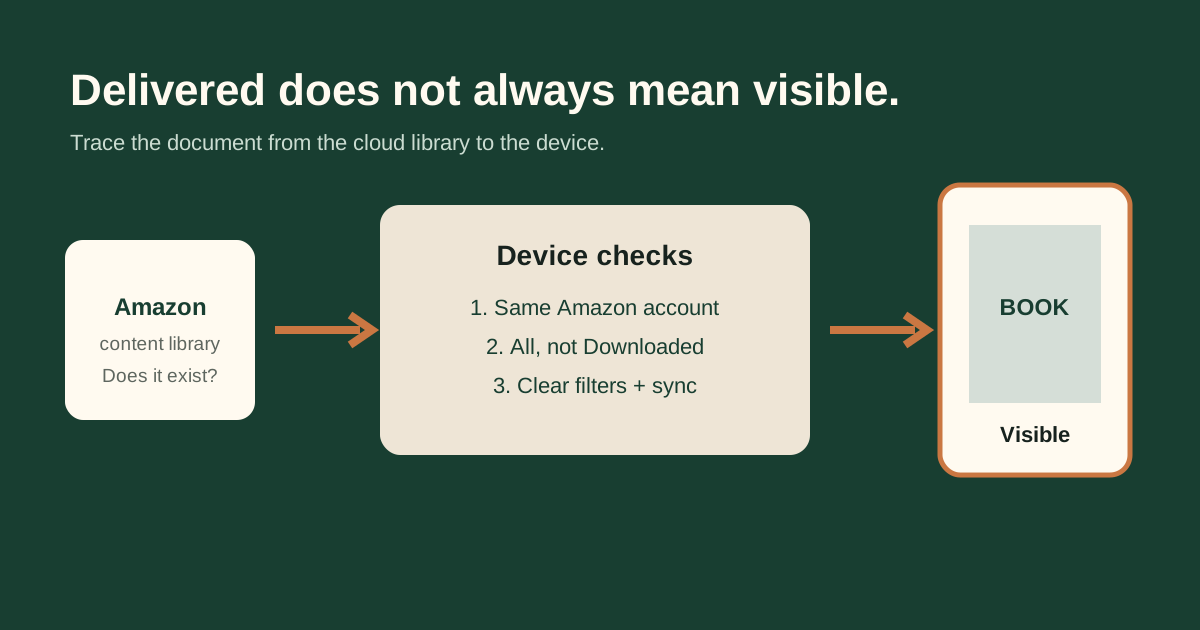
Start in the cloud library, not on the device
The cloud record tells you whether Amazon accepted and attached the document to an account. If the item is missing there, repeated syncing cannot make it appear. Check the original upload status or email result and confirm which Amazon account performed the send.
If the document is present online, stop editing the EPUB for the moment. Delivery worked; the remaining checks belong to the receiving device and its library view.
Confirm the same Amazon account
A browser can remain signed into a different regional account from the Kindle on your desk. Compare the account registered on the device with the one used for Send to Kindle. A shared computer, old marketplace login or recently replaced Kindle makes this mismatch more likely.
Use All, clear filters and search metadata
Choose All rather than Downloaded. Remove Book, Unread or collection filters and sort by Recent. Search both title and author because Kindle normally displays metadata stored inside the EPUB, not necessarily its filename.
Sync once on a stable connection
Connect to Wi-Fi and use Sync or Sync and Check for Items. Leave the library open while it refreshes. If the cover appears in the cloud but not locally, tap it to download rather than creating another uploaded copy.
When the EPUB is actually relevant
Inspect the file only if this one EPUB repeatedly fails while a known-good EPUB reaches the same account. If both files are absent, the route, account or service is the stronger explanation.
Not sure which problem you have?
Answer five questions to separate an EPUB error from an Amazon account, service, email, library or device problem.
Run the troubleshooter →